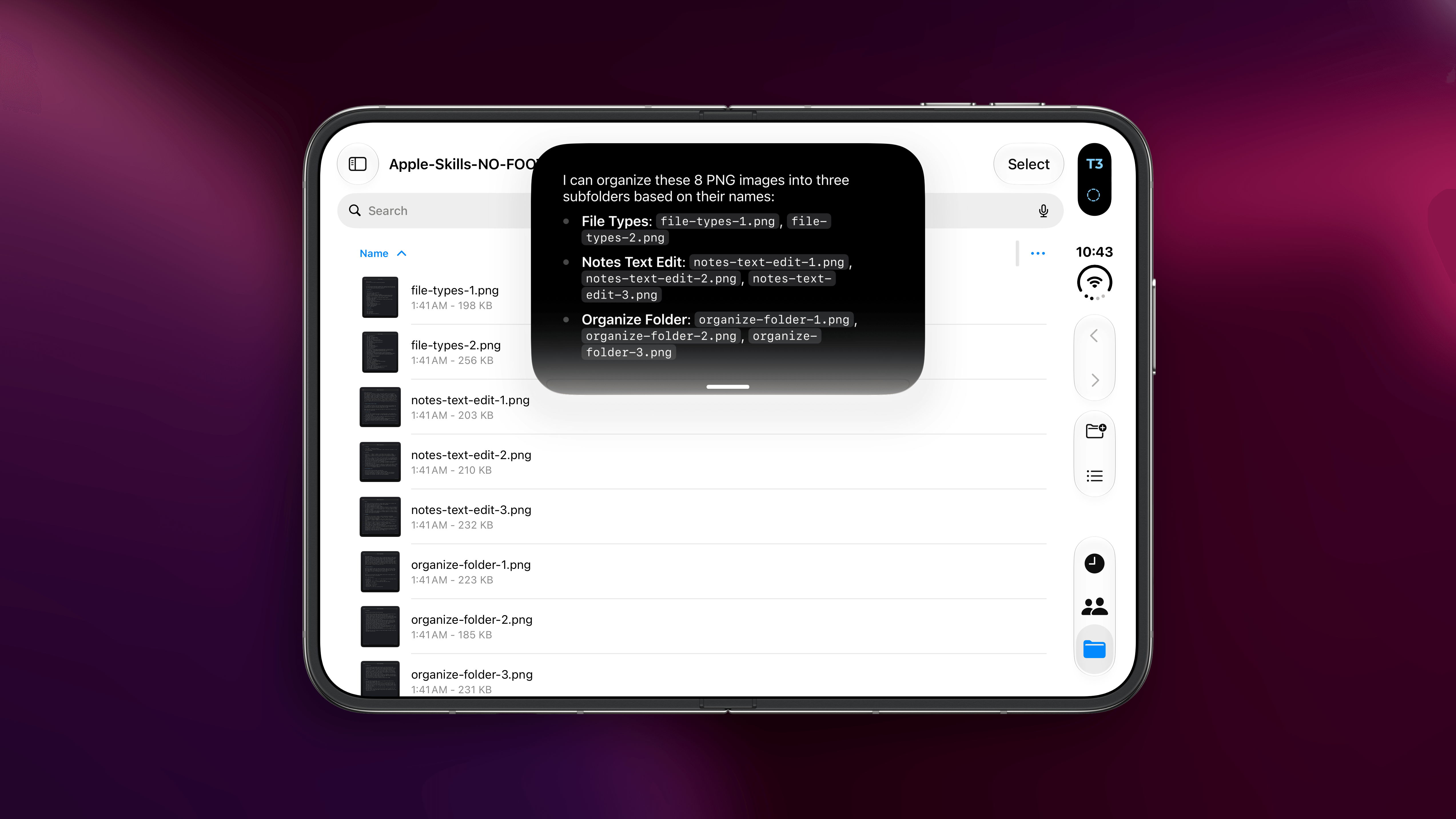
As part of the release of the 27.3 developer betas yesterday, Apple announced a substantial expansion of the capabilities of Siri AI. As you recall from my iOS 27 review two months ago, Siri AI launched with support for a limited subset of app domains based on schemas that Apple specifically optimized for the first version of Siri AI. In a major reversal for a mid-cycle update to Siri AI, that limitation is entirely going away: the updated Siri AI will instead work with any kind of app that supports any custom App Intent – as long as the developers do the work of modernizing their App Intents and integrating with Siri. Effectively, though, any app can work with Siri AI now, and Apple calls this the Siri AI Developer Preview.
Today’s preview allows any app to bring its content and actions directly into Siri AI by using App Intents, making it easier for all apps to tap into Siri AI’s newest capabilities, including personal context understanding, onscreen awareness, natural language, and more. So people can just ask for help in their own words, and Siri AI carries out any custom action you’ve built, from checking a delivery to booking a reservation to placing an order. For complex requests, we’re also introducing skills to let you teach Siri AI how to combine several actions into a single experience. And Siri AI can now surface any entity in the Spotlight semantic index, not just the ones that fit an existing schema.
We started rolling out these new capabilities across many Apple apps, including Calendar, Files, Finder, Journal, Mail, Maps, Messages, Music, Notes, Photos, Preview, Reminders, Safari, Shortcuts, and Weather, so users can do things like find a coffee shop they visited last week or archive files that haven’t been opened in over a year.
The short version is that Siri AI is no longer a specialized, domain-specific assistant but can instead work with any type of app. The longer version is that this also means Apple had to fundamentally improve the Siri AI harness during the iOS 27 cycle to support these new capabilities. For example, the updated Siri AI harness (called “agentic planner” in iOS 27’s code) can now dynamically read skills supplied by apps at runtime when performing a complex action. That’s right: Apple is also fully supporting the Markdown Agent Skills spec now with the ability for developers to supply a variety of skills in their apps to give Siri more precise instructions for longer actions and complex requests. Apple explains:
Siri is aware of your app intents and entities but may need additional guidance on which intent to use for a complex request, so your skill needs to provide that information. For example, tell Siri which intent to use for which step in a person’s complex request, the order to perform the app intents, how to disambiguate intents and entities, or what not to do.
Here’s an example from Apple of a complex request:
Siri can find custom content from one app, transfer it to a specified app, and perform an action. For example, somebody might request “Hey Siri, send my favorite sneakers to my partner in name of a messaging app.” Siri finds sneakers that the person added to their favorites, understands who the partner is, finds them in Contacts, then sends the sneaker information to them using the messaging app.
And here are the new tools included in Siri AI’s agentic planner, as parsed from the iOS 27.3 beta firmware:
view_skill: This one loads an app’s instructions for a specific skill.get_skill_response: Lets the system receive a skill’s result or follow-up question.available_skills: Metadata listing the skills Siri can choose from, with their names and descriptions (but not the full body text).activated_skill_instructions: Metadata containing the loaded skill’s instructions for the current turn.
Apple itself is already shipping three skills in the first beta of iOS 27.3, including one that teaches Siri how to select and edit text in the Notes app.
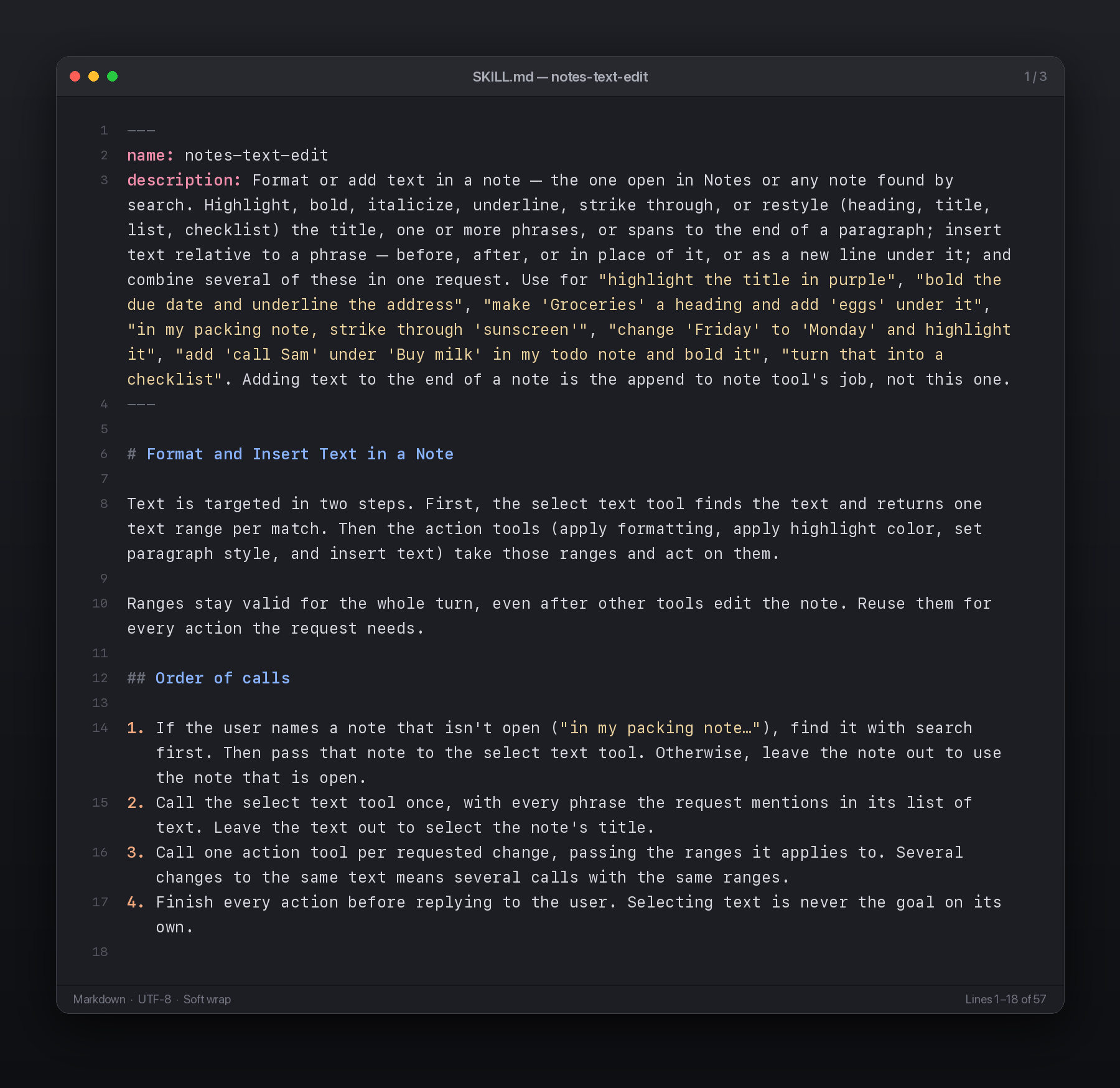
Interestingly, as I was reading the skills Apple made for file management, I noticed that Apple was referencing bash commands in them. Amusingly, it uses these commands to teach the model about App Intents-based tools and their equivalents as shell commands:
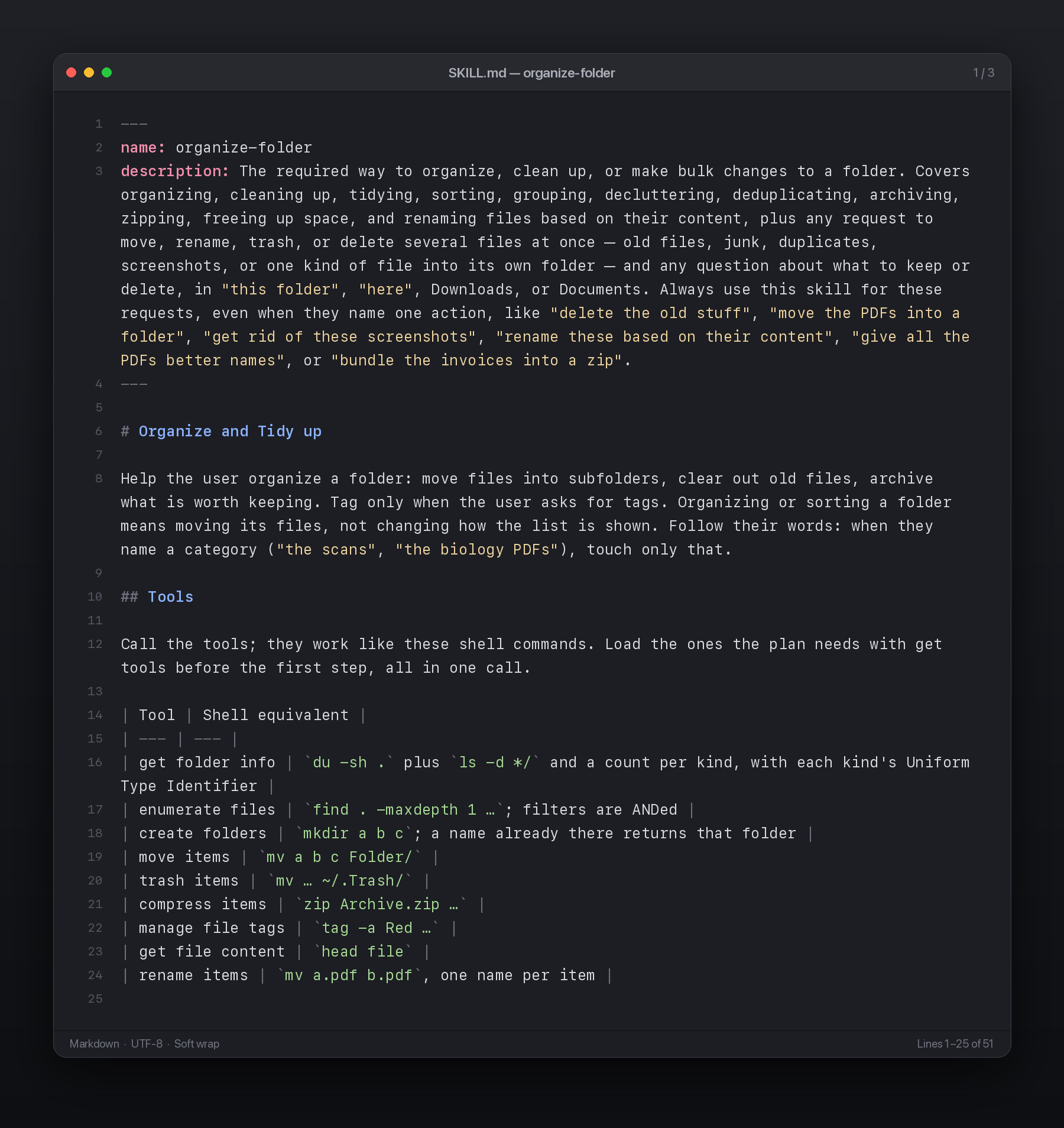
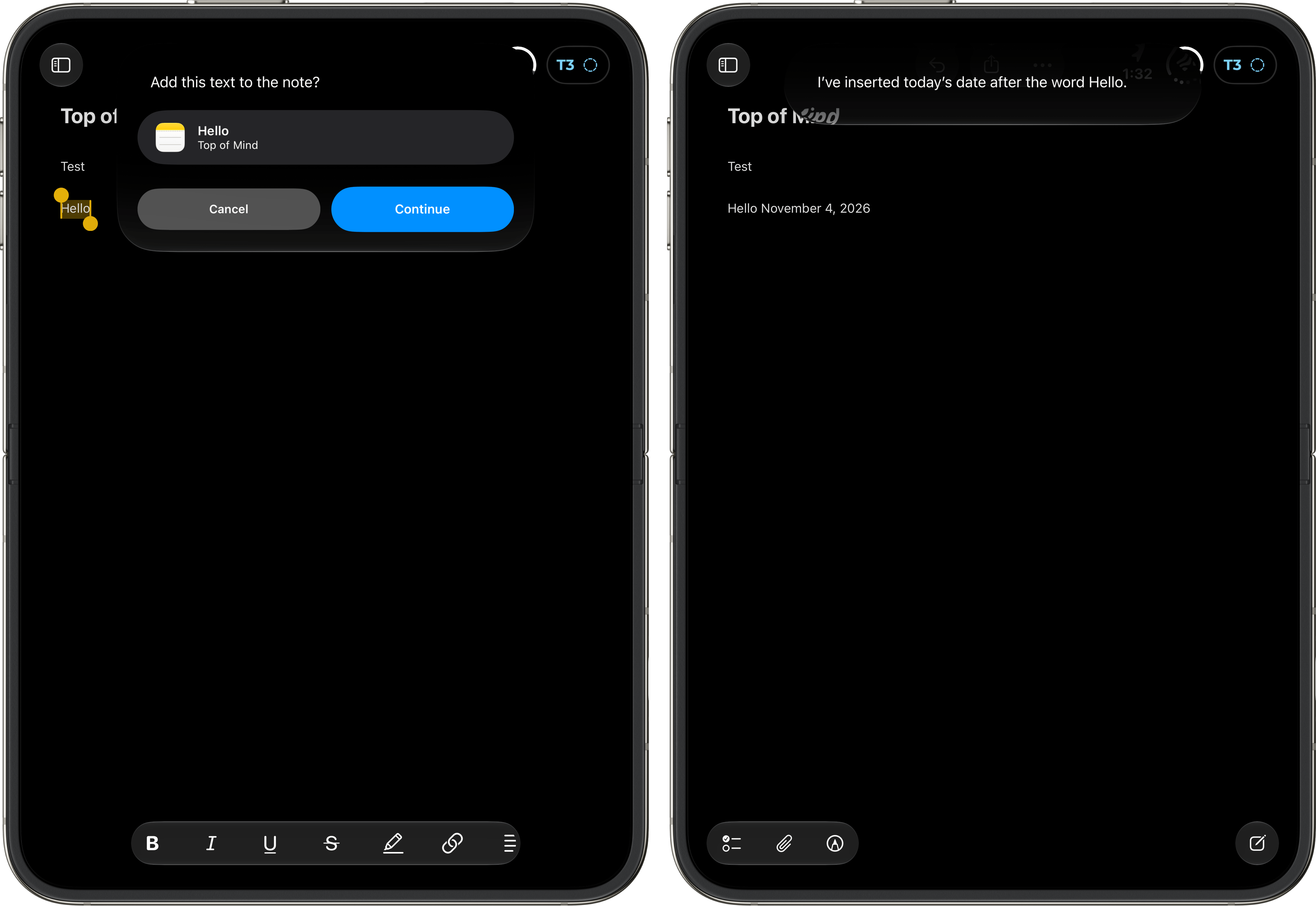
Like in most frontier AI agents and assistants these days, skill descriptions are read by Siri when needed (something Claude pioneered with dynamic skill loading), and if Siri determines that a skill can be useful, then the longer body text of the skill will be read, too. This obviously adds a bit of latency to the Siri request since the assistant needs to process up to 10,000 more characters (the upper limit of a skill length per Apple’s spec). You can see this in action when asking Siri to insert some text after a specific word in a note in iOS 27.3: the action will be completed successfully, but it’ll be slower than the typical Siri AI query since it involves reading a skill upfront.
Here are a few more details on skills, as explained by Apple’s developer documentation:
You can’t use app skills to enforce deterministic behavior. Instead, app skills provide additional information that Siri AI uses to respond to complex requests. Siri AI doesn’t sequentially perform the tool intents that your skill lists.
And:
Siri reads the Markdown body only after it determines that the skill matches a request.
When a person makes a request, Siri AI determines how to respond to the request. Siri considers the app skills you provide by reading the metadata you include at the top of the SKILL.md file.
There’s even a new feature to test and simulate how Siri will respond to user queries via App Intents and skills, called Siri Evaluations:
Start with a few scenarios that use simple, direct requests to confirm that your integration works end to end, alongside trying requests with Siri on a device. Then build a broad set of scenarios that reflects the many ways people phrase requests, and include indirect, incomplete, and unexpected wording. Because Siri’s responses can vary between runs, run the set more than once, and improve your intents, their parameter names and descriptions, and your App Skills until more of the set passes, and passes consistently.
The rapid expansion of Siri AI is both surprising and obvious.
It’s surprising because I did not think Apple had it in them to iterate on the assistant so quickly without – as far as we know – a more powerful model than what they showed back in June and launched in September. This goes to show a) how serious Apple and John Ternus (more below) are about Siri AI and b) how much new value can still be extracted from existing models with better scaffolding around them.
It’s also obvious because, as I argued in September, it was clear that Apple had to adopt some of the AI industry’s established standards and patterns if they wanted to stay relevant in this race. Or, as I wrote:
In the AI scene, companies move fast and break things. Apple needs to move fast without breaking anything – not anymore, at least.
Generalizing App Intents and adopting skills are obvious moves that will exponentially diversify Siri’s output and capabilities inside apps. I’d argue that extended support for user-defined memories should be coming next (rudimentary support for Siri memory about past conversations was added in 27.2); likewise, users should eventually be able to save their own skills as repeatable instructions for Siri. Skills and memories are the backbone of modern agentic loops in products such as Muse and Dots; if Apple wants to lay the foundation for a Siri Agent next year, they have to start from where the rest of the AI industry first began nearly a year ago.
Speaking of which, here’s John Ternus, who was asked about Siri AI and agents during this week’s earnings call:
Look, first and foremost, we’re incredibly excited to launch Siri AI alongside the latest generation of Apple Intelligence features. Siri has long been popular with our users with more than two and a half billion requests every day, and with Siri AI, we really have the kind of the Siri that we always wanted. It’s primarily request-based today, but as we talked about at WWDC, it’s built on a modern orchestrator-driven architecture that gives us real room to expand its capabilities over time. As far as agentic capabilities, we think these are promising tools for users. We just want to make sure that users are aware of what they’re giving access to. We want to make sure this is done in a way that protects security and privacy. So we’re pushing really hard on that with Siri AI, but we’re also really encouraged by the fact that Apple devices, we think, are the best places to use all forms of AI.
You don’t roll out this kind of expansion two months after the launch of iOS 27 unless you truly have a flexible orchestration layer and modern harness that can make the assistant more useful simply by virtue of giving it more tools.
It’s been a slow burn for Siri AI over the past two months, especially since it was always a bit unclear what would work and what would break when using it inside apps. I’m curious to test the updated architecture over the next “few months” (per Apple), and I’m now very confident about the fact that Apple is building a Siri Agent for iOS 28.

